
Getting started
This page covers everything between opening the case and your first calibrated session: what ships in the box, where to get the software, how to set up the included power bank and Wi-Fi adapter, and a checklist to confirm you are ready to use the suit.
What's in the case#
The shipping case contains the suit itself (jacket and trousers) along with accessories and documentation. XR5 includes a power bank, which ships in a separate package. A Wi-Fi adapter is included in the case.
Opening the package#
Unpack the case and verify that all items are present and undamaged. The case includes the TESLASUIT, its accessories, and the documentation. Confirm that the separately shipped power bank has also arrived.
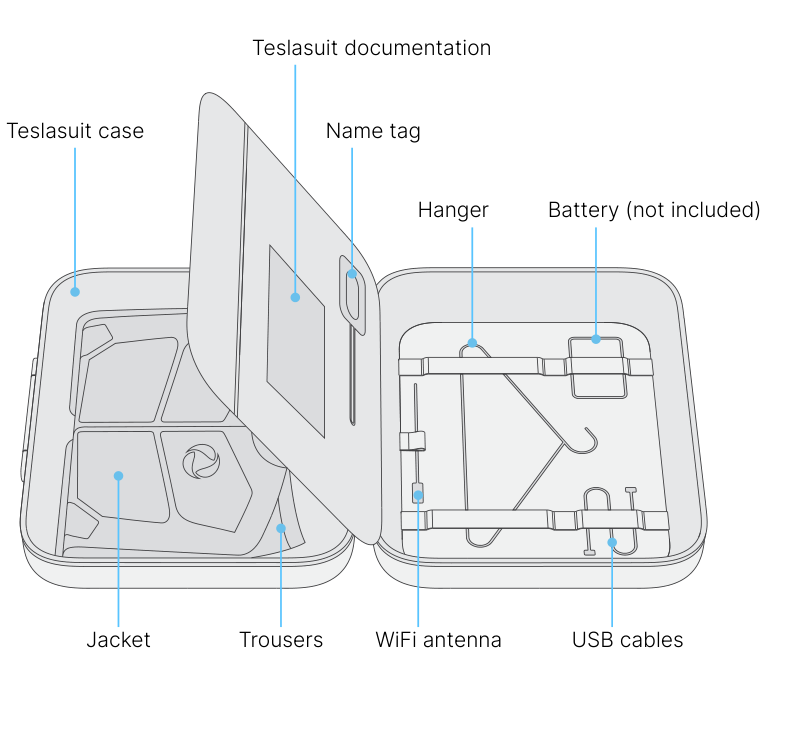
The suit:
- Jacket
- Trousers
Additions:
- TESLASUIT documentation
- Name tag
- Hanger
- Wi-Fi antenna
- Wi-Fi adapter
- Connection cables (2× USB Type-C)
Connection kit:
- 300 mm USB Type-C male-to-male cable — for connecting the power bank to the jacket.
- 450 mm USB Type-C male-to-male cable — for connecting the trousers to the jacket.
- Electrical signal terminator — fit this into the trousers connector when using the jacket on its own.
A printed Safety Note is also included, covering medical contraindications and tips on using and storing the suit. The QR-code label on the suit is needed for Developer Portal access — do not remove it (see Hardware - Care).
Power bank ships separately
XR5 includes a power bank; it is packed separately from the shipping case for ease of logistics. For the purposes of the IATA Dangerous Goods Regulations (PI 967, Section 2), power banks are classified as batteries (UN 3480, lithium-ion, or UN 3090, lithium-metal) and must be carried in carry-on baggage only. Confirm you have received the power bank before first use. Characteristics are listed in Hardware - Specifications.
Software support#
You can always find and download the latest software on the Teslasuit Developer Portal at developer.teslasuit.io/downloads. If you have questions, check the forum or contact the support team by email at support@teslasuit.io.
The suit is operated through the software available on the portal, which provides:
- Control Center - Overview — pairing, connection, calibration, and updates
- Studio - Overview — data capture, analysis, and haptic authoring
- APIs for integration
To do
Keep the QR-code label on the suit — it's used to access the Developer Portal. See Hardware - Care.
Power bank and Wi-Fi adapter#
Power bank#
The included power bank supplies the suit and sits in the dedicated pocket on the back of the jacket. It ships separately from the case; use the supplied unit (or a replacement that meets the same characteristics):
- Dimensions (L × W × H): minimum 125 × 60 × 12 mm; maximum 145 × 72 × 20 mm.
- Weight: 350 g maximum.
- Battery cell type: Lithium Polymer.
- Capacity: at least 10000 mAh.
- USB Type-C input and output supporting 5 V DC / 3 A (and higher-voltage profiles such as 9 V DC / 2 A and 12 V DC / 1.5 A).
- Protection functions: short-circuit, overcharge, over-discharge, overcurrent, overvoltage, and over-/under-temperature protection.
See Hardware - Specifications for the consolidated power requirements.
Wi-Fi adapter#
TESLASUIT connects to your computer over Wi-Fi. XR5 includes a Wi-Fi adapter in the shipping case — use it when the host PC has no suitable built-in Wi-Fi module (or when you need a dedicated adapter for direct mode).
When you plug in the adapter for the first time, install any required drivers and connect the device to a Wi-Fi network. To confirm a Wi-Fi connection is available, open your computer settings, find the network and internet section, and check that Wi-Fi options are present. A few rules help ensure the adapter works with TESLASUIT:
- Use an adapter compatible with Windows 10/11 per its technical specification.
- Prefer an adapter that works through the default Windows network menu and does not require custom software or drivers.
- Download and install the latest drivers from the adapter manufacturer's website.
- Make sure the adapter is compatible with the 802.11 b/g/n standards and supports the 2.4 GHz frequency.
See Control Center - Pairing & Connection for how the connection is established once the adapter is ready.
First-use checklist#
Before your first session, confirm each of the following:
- You have no absolute contraindications (see Hardware - Safety) and have consulted your doctor in case of any doubt.
- All safety requirements are met — read Hardware - Safety in full.
- You have an internet connection.
- Your computer has Wi-Fi to connect to the suit; if not, use the included Wi-Fi adapter.
- You have local admin rights to install software on your device.
- You are at least 18 or 21 years old, depending on your jurisdiction.
With those confirmed: install the software and sign in to the Developer Portal, charge the power bank, pair and connect the suit in Control Center - Pairing & Connection, put the suit on per Hardware - Wearing, and calibrate via Control Center - Calibration.