
Components & channel layout
TESLASUIT is composed of two garments — the jacket and the trousers — that together carry the electronics for all three of the suit's systems. This page walks through each major component: the control unit and nodes that coordinate everything, the haptic channels, the mocap sensors, the PPG sensor, and the connectors and power supply that tie them together.
Control unit & nodes#
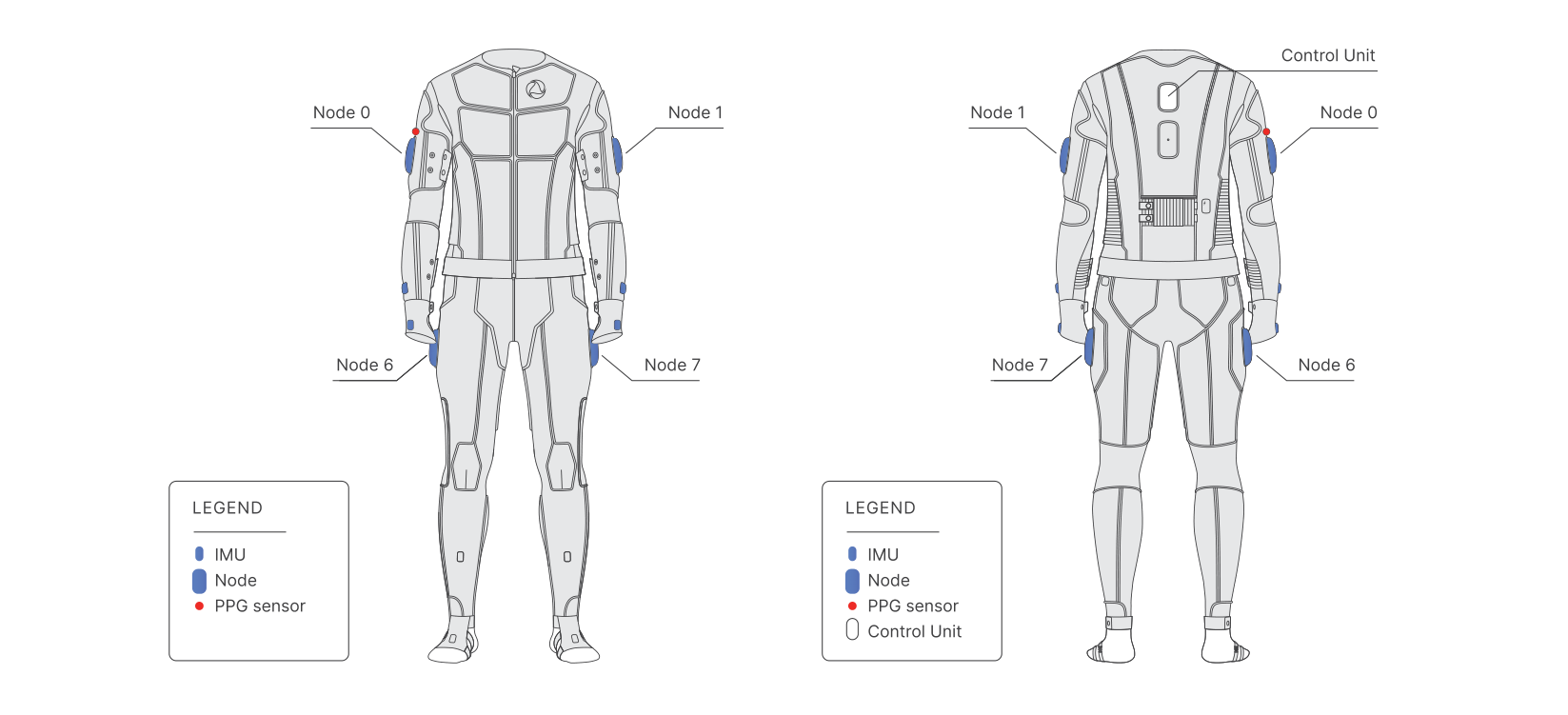
The control unit is the main control element of TESLASUIT. It coordinates and manages the operation of all nodes, contains the internal Wi-Fi module, and provides the connection to a host device. Because it processes information coming from every node, the control unit is housed in the jacket, the central garment of the suit.
A node manages the operation of the haptic, mocap, and biometry systems within a specific area of the body — for example an arm, a leg, or the torso. Each node includes a commutation module that selects which haptic channels are active in its area. This division of labour lets the control unit issue high-level commands while the nodes handle the moment-to-moment switching of the electrodes. Motion capture uses separate IMUs and the PPG sensor is optical, so neither shares the haptic electrodes.
Haptic feedback areas#
Haptic feedback is provided in 80 special areas called channels. One channel is a pair of shaped electrodes placed in anatomically suitable locations; when the channel fires, it induces a muscle contraction or a tactile sensation. The careful mapping of electrodes to anatomical sites is what allows the suit to stimulate specific muscle sets and produce precise, predictable EMS effects rather than a diffuse buzz.
- 114 electrodes in total, arranged into 80 channels.
- 62 electrodes are placed in the jacket; 52 electrodes are placed in the trousers.
- The jacket and trousers therefore carry different channel counts — see Hardware - Specifications for the exact split.
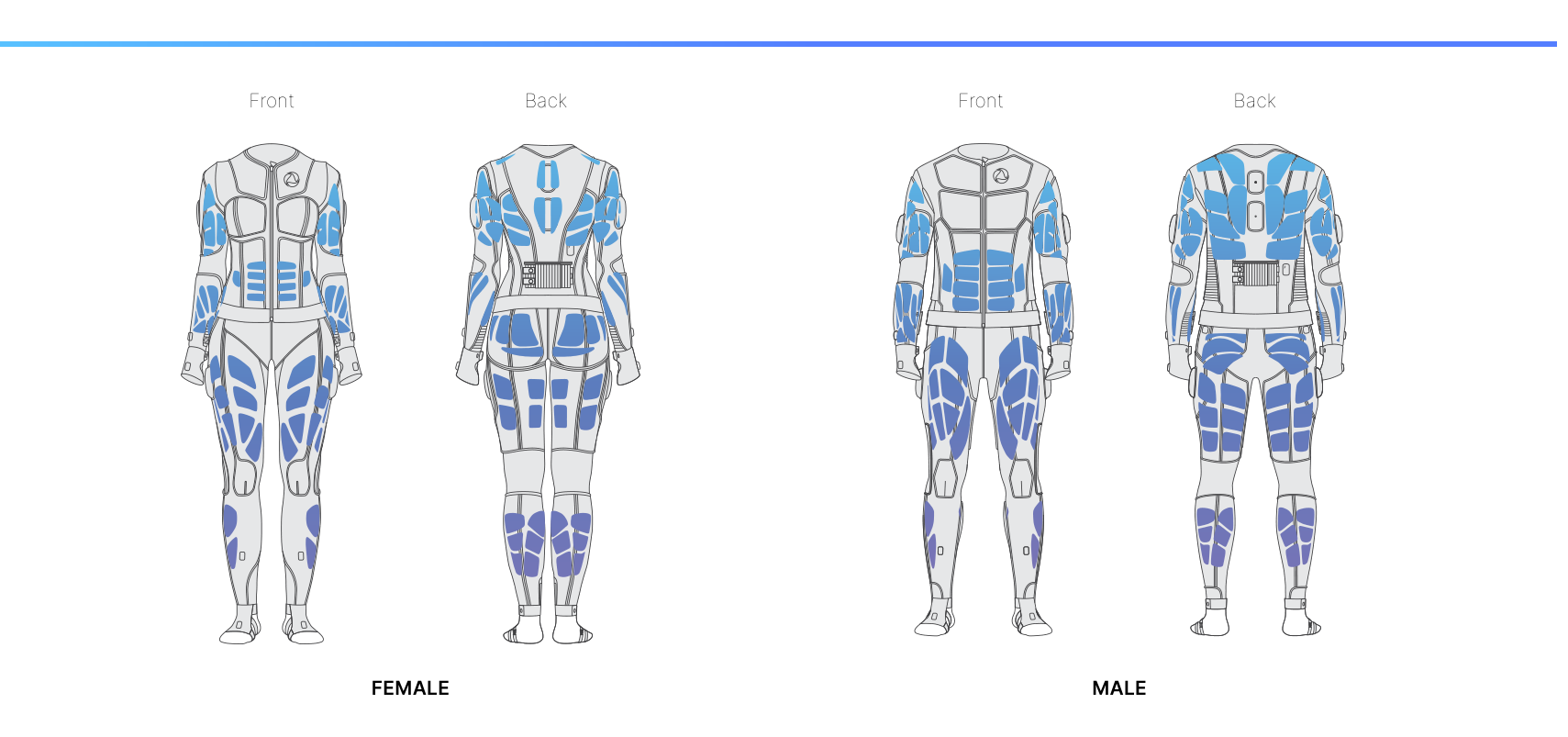
The distinction between an EMS channel and a haptic channel — and the fact that one muscle can be driven by several channels at once — is explained in Concept - Haptics.
Mocap sensors#
Motion capture is provided by several sets of sensors located on different body parts. Each set is an inertial measurement unit (IMU) containing an accelerometer, a gyroscope, and a magnetometer; together these give complete information about how the user's position changes in space. TESLASUIT has 14 IMU sets distributed as follows:
- Upper arm (left and right) — 1 set each
- Wrist (left and right) — 1 set each
- Hand (left and right) — 1 set each
- Back (jacket and trousers) — 2 sets
- Thigh (left and right) — 1 set each
- Shin (left and right) — 1 set each
- Foot (left and right) — 1 set each
The sensors run in either 6-axis or 9-axis mode, which trade off magnetic-interference immunity against heading stability — see Hardware - Wearing for how the modes behave in practice and Concept - Mocap for the underlying concept.
PPG sensor#
A single PPG (photoplethysmography) sensor collects the biological and physiological characteristics of the wearer. PPG is a simple, non-invasive optical technique that detects volumetric changes in blood in peripheral circulation at the surface of the skin. From these measurements the suit derives pulse and heart rate (BPM). The sensor is placed on the outer right shoulder, where the deltoid ends, in the upper-right sleeve of the suit. See Concept - PPG.
Connectors & power supply#
Power is supplied by the power bank, which sits in a specially designed pocket on the back of the jacket. The jacket carries two USB Type-C female connectors, located near the power-bank pocket:
- USB-C (power bank → jacket) — on the left; use the shorter cable supplied with the suit. The connector is marked with an electric symbol.
- USB-C (jacket ↔ trousers) — on the right; use the longer cable supplied with the suit to carry data between the two garments.
If you want to use the jacket on its own, fit the bundled electrical signal terminator into the trousers connector in place of the trousers cable. The power bank is included with XR5 but ships separately; see Hardware - Getting Started and Hardware - Specifications.
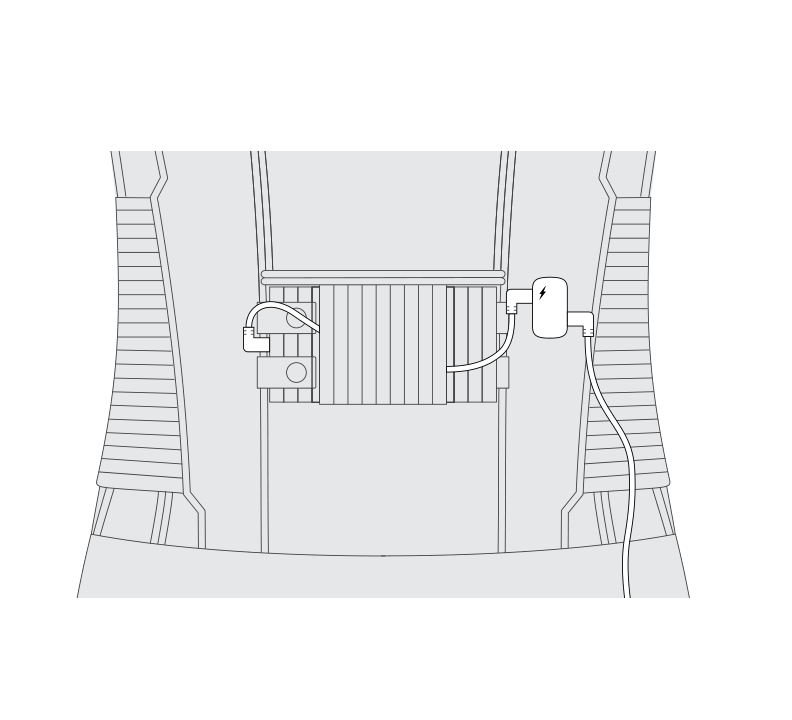
See Hardware - Wearing for the cable connection order and Hardware - Specifications for the full electrical and physical specs.