
Wearing TESLASUIT
Read first
Review Hardware - Safety and its contraindications before putting on the suit. Electrodes contact bare skin and deliver electrical stimulation. Do not wear TESLASUIT when feeling unwell, and always use the suit with external supervision — you may need help from another person to put it on or take it off, or to provide aid if you feel unwell.
You can wear the jacket without the trousers. Before doing so, plug the bundled electrical signal terminator into the trousers cable connector on the jacket.
Before putting on#
TESLASUIT electrodes must contact bare skin to provide haptic feedback. Leave your underwear on, but make sure it does not get between the skin and the electrodes. Female users should avoid any underwear with metal parts, as these can interfere with the electrical stimulation.
Prepare the suit and power bank first:
- Make sure the suit is intact and has no visible defects.
- Open all zippers and fastenings.
- Check the power bank for any visible damage. Do not connect the suit to a damaged power bank.
- Check the power bank's charge level.
- Put the power bank in the pocket at the back of the jacket so that the USB Type-C connector is located between the two fixing straps.
- Snap the buttons of the power-bank pocket closed.
Putting on TESLASUIT#
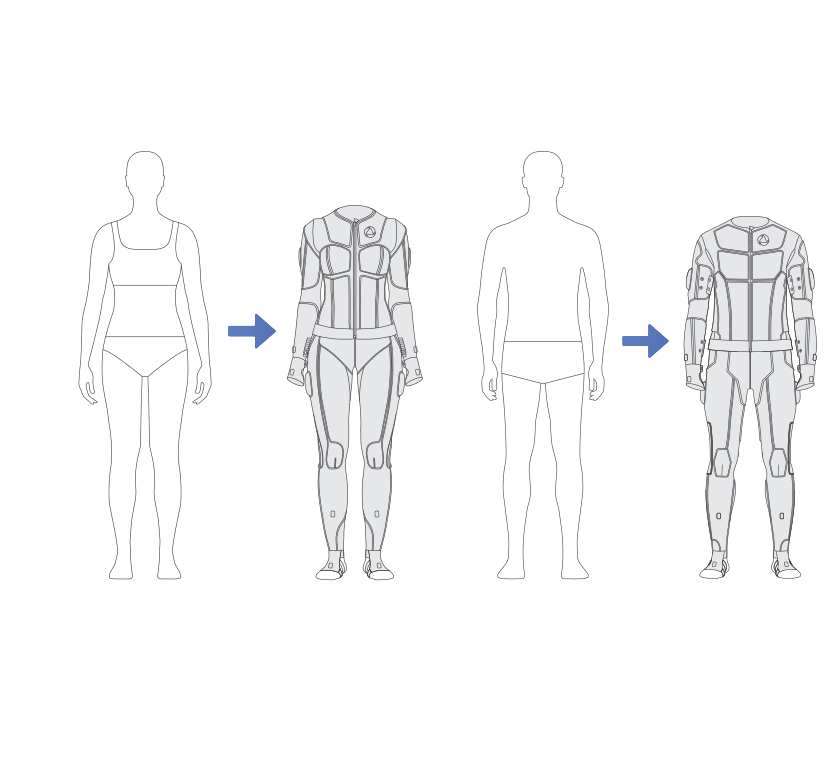
- Take off your clothes (leaving non-metal underwear on, as noted above).
- Carefully put on the suit. Try not to tug the fabric or pull it too hard.
- Close the zippers first, then close the fasteners. The suit should fit tightly to your body but not hinder your movements.
Connecting cables#
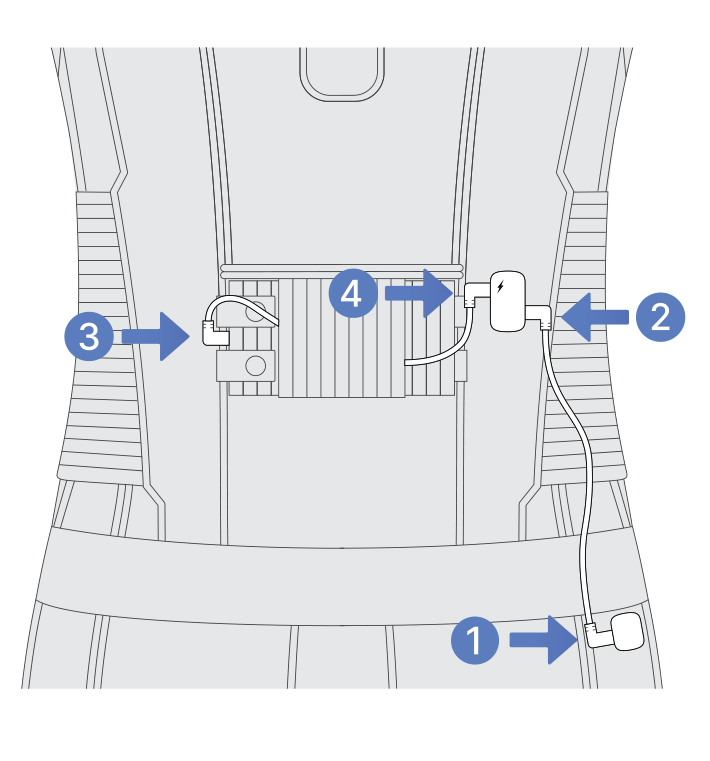
- Take the longer USB-C-to-USB-C cable and plug one end into the only connector on the trousers and the other end into the correct (right) connector on the jacket. This carries data between the garments.
- Take the shorter USB-C-to-USB-C cable and plug one end into the power bank and the other end into the left connector on the jacket. This supplies power.
Mocap sensor modes#
The mocap sensors operate in two modes:
6-axis mode is set for TESLASUIT by default. It uses only the accelerometers and gyroscopes to capture movement. In this mode, calibration requires arranging all sets of sensors in defined positions relative to one another, and the calibration is not preserved across sessions.
9-axis mode uses all three sensor types available in the suit — accelerometers, gyroscopes, and magnetometers. Here the calibration of each sensor set is independent and referenced to the North Pole, and the calibration is preserved in teslasuit.service across different sessions. Note that 9-axis mode is an experimental setting.
Warning
Ferromagnets can influence 9-axis mode. When using it, make sure there are no large metal objects nearby.
See Concept - Mocap for the trade-offs and Control Center - Calibration for the calibration procedure. It is recommended to calibrate the mocap sensors before checking the fit of the electrodes.
Global haptic power#
Global haptic power is a single value, measured in percent, that is applied to any connected suits in all applications running on the same PC. It acts as an attenuating coefficient for the power set in an animation: the animation's haptic power is multiplied by the global coefficient and then recalculated within the minimum and maximum limits set for each channel during calibration. We recommend using a global haptic power of 100% during haptic calibration, so that you never accidentally set the power higher than your comfortable level. See Concept - Haptics.
Calibrating haptic feedback#
Haptic feedback is provided using electrical impulses to create sensations or elicit a muscle contraction, and it requires calibration because each person reacts individually to stimulation with the same parameters. Without calibration, identical settings could be painful in one location and imperceptible in another, since tissues respond differently depending on the body part. Calibration is the process of setting the minimum and maximum haptic power for each channel; the power of any animation is then recalculated from those values, with the goal of creating identical, comfortable sensations across all channels.
Warning
If the sensations during calibration are too strong, or you feel pain, dizziness, nausea, or any other physical discomfort, immediately disconnect the power bank and then take off the suit.
Best contact is achieved when the electrodes fit tightly to the skin and the skin is slightly moist — you can do a few exercises to perspire, but do not pour liquid on your skin.
Calibration works across three levels, from broad to fine:
- Area level — adjust minimum and maximum values for all channels within a large body zone simultaneously. Power increment is 5%.
- Part level — the same idea applied to a smaller body zone (a Part is smaller than an Area). Power increment is 5%. For example, if two channels in a part have maximums of 65% and 70% and you lower the part by 5%, the resulting maximums become 60% and 65%.
- Channel level — set the minimum and maximum for each channel individually. Power increment is 1%.
The recommended workflow:
- Calibrate with global haptic power set to 100%, and recalibrate whenever you significantly change the global coefficient.
- Start with the areas, then adjust the parts, and finally fine-tune individual channels only if necessary.
- For each scope, find and set the minimum value first, then define the maximum.
This page covers the concept; run the full procedure in Control Center - Calibration. See also Concept - Calibration.
Taking off TESLASUIT#
To take off the suit properly:
- Disconnect the power bank: unplug the cable from the power bank and from the jacket, then unplug the trousers cable from the jacket and from the trousers connector.
- Open all fastenings.
- Open all zippers.
- Carefully take off the suit.
Warning
Don't tug on the suit too strongly, as this may tear the seams of the fabric.
Store the suit per Hardware - Care.